
Best Arma Reforger Console Mods (2026): Top Workshop Mods for Xbox & PS5
The best Arma Reforger console mods for PS5 and Xbox, from Overthrow to Kunar Province, plus how to install Workshop mods and join modded servers.

Thanks to full Workshop support on Xbox Series X|S and PlayStation 5, Arma Reforger console mods have completely transformed the experience for console players. What was once considered one of PC gaming's biggest advantages is now available on consoles, allowing players to download community-created maps, missions, vehicles, weapons and gameplay overhauls directly from within the game.
Since launching Workshop support, Bohemia Interactive has opened the door to thousands of player-made creations. Whether you're looking for realistic military operations, immersive roleplay servers, large-scale insurgency campaigns or entirely new locations to explore, there's now an Arma Reforger console mod for almost every style of play.
Unlike many games that limit modding on consoles, Arma Reforger provides a streamlined experience. Players simply browse the in-game Workshop, subscribe to a mod and let the game handle the installation automatically. This ease of use has helped create a thriving community, with new content appearing almost daily.
In this guide, we'll look at some of the best Arma Reforger console mods available in 2026, explain what makes each one worth downloading and show you how to install them on Xbox and PS5. Whether you're completely new to modding or searching for your next favourite Workshop creation, these recommendations offer some of the best experiences the Arma Reforger community has to offer.
Can you get Arma Reforger mods on PS5 and Xbox?
Yes. Arma Reforger supports mods on both PS5 and Xbox Series X|S through the in-game Workshop, so you can download community maps, weapons, vehicles and game modes without a PC. Just open Workshop from the main menu, subscribe to a mod, and it downloads automatically. Many modded servers download what they need when you join.
A small number of Workshop mods are PC-only, so if a mod doesn't appear on your console, it hasn't been made available for that platform. Our top five picks below all work on console. If you're new to modding, Overthrow is the best place to start.
Arma Reforger Console Mods at a Glance
| Detail | Information |
|---|---|
| Game | Arma Reforger |
| Developer | Bohemia Interactive |
| Platforms | Xbox Series X |
| Workshop Support | Yes |
| Price | Free |
| Mod Type | Community-created |
| Installation | In-game Workshop |
| Updated | 2026 |
Why Arma Reforger Console Mods Are So Popular
Few games embrace community creativity quite like Arma Reforger. Long before official mod support arrived on consoles, the Arma series built its reputation on user-created content, with players designing everything from realistic military campaigns to entirely new game modes.
Now that Xbox and PlayStation players have access to the same Workshop ecosystem, the game's lifespan has expanded dramatically. Instead of replaying the same official scenarios, players can join persistent insurgency campaigns, realistic roleplay communities, survival experiences and custom operations that often rival professionally developed content.
Another major advantage is how simple the Workshop has become. There's no need to connect a USB drive, install third-party software or manually move files between devices. Everything is handled within Arma Reforger itself, making it one of the most accessible modding systems currently available on consoles.
Perhaps the biggest reason these mods have become so popular is the variety they offer. Some focus on realism by introducing authentic modern military equipment and vehicles, while others create entirely new ways to play through roleplay systems, dynamic campaigns or enhanced mission creation tools. With thousands of Workshop downloads available, players rarely run out of fresh experiences.

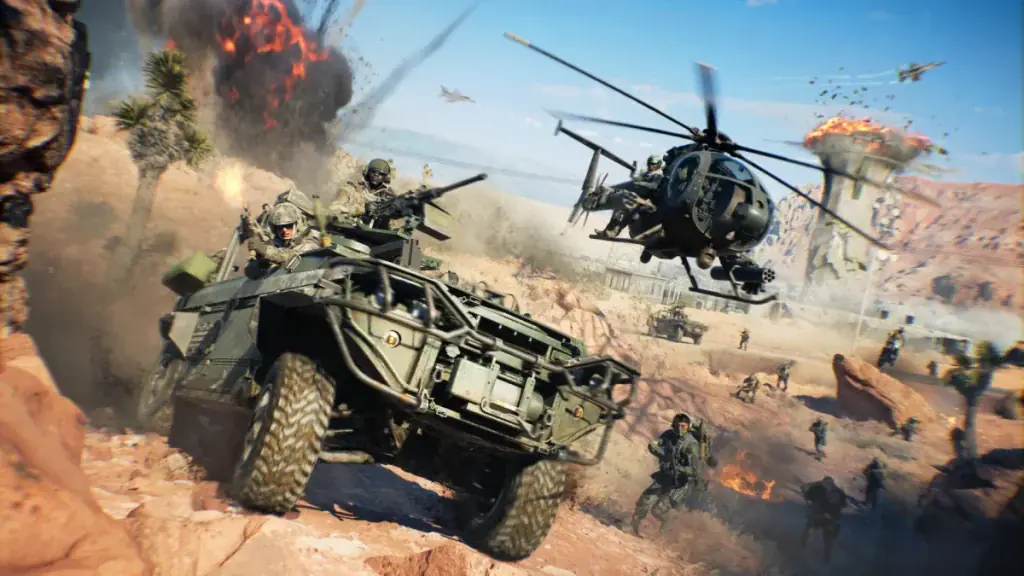
Some of the best console mods expand Arma Reforger with larger battles featuring helicopters, vehicles and combined arms warfare.Image: Arma Reforger Workshop (mod authors)
Best Arma Reforger Console Mods
1. Overthrow
If you're only going to install one mod, Overthrow is the easiest recommendation. Widely regarded as one of the most ambitious projects available for Arma Reforger, it transforms the game into a persistent insurgency campaign where every decision has long-term consequences.
Instead of spawning as a heavily equipped soldier, you'll begin with limited resources and gradually build a resistance movement against occupying forces. Capturing villages, earning civilian support, constructing forward operating bases and expanding your influence all contribute to an evolving campaign that rewards careful planning rather than reckless combat.
Unlike traditional multiplayer scenarios that reset after each match, Overthrow creates a persistent world where your progress carries over between sessions. This makes it particularly rewarding for groups of friends who enjoy working towards long-term objectives.
Best For
- Persistent co-operative campaigns
- Tactical teamwork
- Long-term progression
- Players looking for hundreds of hours of gameplay
Standout Features
- Persistent save and load system
- Dynamic civilian support mechanics
- GTA-style wanted system
- Black market economy
- Capturable towns and military bases
- Buildable forward operating bases
- Fast travel network
- Dynamic Quick Reaction Force (QRF) battles
Things to Know
While Overthrow works brilliantly in multiplayer, Xbox players should note that the single-player experience remains limited. The mod is designed primarily around community servers and cooperative gameplay, making it much more enjoyable when played with others.

Many Arma Reforger console mods focus on teamwork, adding custom factions, equipment and realistic military scenarios for Xbox and PS5 players.Image: Bohemia Interactive
Workshop Links
2. RPLife
If you're looking for something completely different from traditional military operations, RPLife offers one of the most immersive roleplaying experiences available in Arma Reforger. Developed by Decimation Games, the mod builds upon the Everon Life Framework to create a persistent world where every player can choose their own path.
Instead of focusing solely on combat, RPLife allows players to become police officers, paramedics, mechanics, business owners or ordinary civilians. Every action has consequences, and the decisions you make can influence the wider community, making each server feel like a living world rather than a scripted scenario.
Roleplay has always been one of the biggest strengths of the Arma series, and RPLife brings that experience to console players through the Workshop. Whether you're responding to emergencies, enforcing the law or simply earning money to buy vehicles and property, there's always something happening.
Best For
- Roleplay communities
- Civilian gameplay
- Police and emergency services
- Long-term multiplayer servers
Why We Recommend It
Unlike many roleplay mods that rely heavily on imagination alone, RPLife introduces systems that encourage meaningful interaction between players. The persistent economy, player-driven jobs and community-focused gameplay create stories that develop naturally over time.
If you've ever enjoyed roleplay servers in games like GTA V FiveM, you'll feel right at home here.
Key Features
- Persistent roleplay servers
- Dynamic economy
- Police, EMS and civilian careers
- Vehicle ownership
- Community-driven gameplay
- Player progression
- Ongoing development
Required Dependencies
To run RPLife correctly, you'll also need:
- Everon Life
- Enfusion Database Framework
- Enfusion Persistence Framework
Fortunately, all required files are available through the Arma Reforger Workshop.

Vehicle mods like the Hell Raiser tank add powerful armoured combat to Arma Reforger's console Workshop.Image: Arma Reforger Workshop (mod authors)
Workshop Links
3. Modern Military Equipment (MME)
For players who prefer authenticity, Modern Military Equipment (MME) is one of the best Arma Reforger console mods available. Rather than changing how the game works, MME expands the sandbox with a huge collection of modern weapons, armour, tactical equipment and military vehicles inspired by real-world armed forces.
The base version of Arma Reforger already offers impressive military gameplay, but MME significantly increases the variety of equipment available to mission creators and multiplayer communities. Whether you're recreating NATO operations, modern conflicts or custom PvP scenarios, the additional gear gives players far greater freedom.
The mod is also widely supported by community servers, making it a common requirement for many realistic military operations.
Best For
- Military simulation
- Tactical PvP
- Modern combat scenarios
- Community servers
Why We Recommend It
If realism is your priority, MME should be one of the first mods you install. The expanded arsenal provides mission creators with more flexibility while giving players access to equipment that feels closer to contemporary military operations.
Key Features
- Modern assault rifles
- Additional pistols
- Tactical body armour
- Modern helmets
- Military uniforms
- Expanded vehicle selection
- Equipment inspired by current NATO forces
Workshop Links
4. Kunar Province
While many Workshop mods introduce new weapons or gameplay systems, Kunar Province focuses on one thing—creating a realistic battlefield.
Inspired by Afghanistan's mountainous Kunar Province, this custom map replaces Everon's rolling countryside with steep valleys, rocky mountain passes and tightly packed villages that encourage tactical movement and long-range engagements.
Every route feels dangerous, forcing squads to think carefully about positioning and communication. Convoys become vulnerable in narrow valleys, infantry patrols must watch surrounding ridgelines and helicopter pilots face challenging terrain unlike anything found in the base game.
Best For
- Large-scale co-operative operations
- Tactical realism
- Long-range firefights
- Military communities
Why We Recommend It
A great map can completely change how Arma Reforger plays, and Kunar Province is one of the finest examples currently available on the Workshop. Its realistic terrain naturally creates engaging firefights without needing additional scripting or gameplay modifications.
Key Features
- Authentic mountainous terrain
- Detailed villages
- Narrow valleys
- Long sightlines
- Challenging helicopter flying
- Excellent multiplayer performance

Kunar Province is one of the most popular custom maps available through the Arma Reforger Workshop, bringing expansive mountainous terrain and new combat scenarios to Xbox and PS5.Image: Arma Reforger Workshop (mod authors)
Workshop Link
5. Game Master FX
If you enjoy creating your own scenarios, Game Master FX is one of the most useful quality-of-life mods available.
Rather than adding new weapons or maps, it enhances the existing Game Master mode with a wide range of visual and audio effects that help mission creators build far more cinematic experiences.
Simple additions like dynamic explosions, weather effects, environmental sounds and improved lighting can dramatically increase immersion during multiplayer operations.
Whether you're running a military campaign, a roleplay event or a story-driven co-operative mission, these additional tools make every scenario feel more polished.
Best For
- Mission creators
- Community server administrators
- Story-driven operations
- Cinematic scenarios
Why We Recommend It
Game Master is already one of Arma Reforger's most powerful features. This mod simply makes it even better, giving creators more control over the atmosphere of every mission.
Key Features
- Dynamic explosions
- Enhanced weather
- Ambient sound effects
- Improved lighting
- Greater mission customisation
- Easy integration with existing scenarios

Many of the best Arma Reforger console mods enhance infantry combat with new factions, weapons, uniforms and tactical gameplay.Image: Bohemia Interactive
Which Arma Reforger Console Mod Should You Try First?
Choosing the right mod depends on the type of experience you're looking for. While every recommendation on this list offers something unique, a few stand out for different playstyles.
| Mod | Best For | Difficulty | Multiplayer | Our Rating |
|---|---|---|---|---|
| Overthrow | Persistent co-op campaigns | Medium | ⭐⭐⭐⭐⭐ | ⭐⭐⭐⭐⭐ |
| RPLife | Roleplay communities | Medium | ⭐⭐⭐⭐⭐ | ⭐⭐⭐⭐☆ |
| Modern Military Equipment | Realism | Easy | ⭐⭐⭐⭐⭐ | ⭐⭐⭐⭐⭐ |
| Kunar Province | Tactical operations | Medium | ⭐⭐⭐⭐⭐ | ⭐⭐⭐⭐☆ |
| Game Master FX | Mission creation | Easy | ⭐⭐⭐⭐⭐ | ⭐⭐⭐⭐☆ |
For most players, Overthrow remains the best starting point thanks to its persistent progression, cooperative gameplay and incredible replayability. If you prefer immersive roleplay, RPLife is an excellent alternative, while military simulation enthusiasts will get the most value from Modern Military Equipment and Kunar Province.
How to Install Arma Reforger Console Mods
One of the biggest advantages of Arma Reforger console mods is how simple they are to install. Unlike many games that require third-party software or manual file transfers, Arma Reforger uses the built-in Workshop, allowing Xbox and PlayStation 5 players to browse, download and manage mods directly from the game.
If you're new to modding, follow these steps to get started.
Step 1: Launch Arma Reforger
Start Arma Reforger on your Xbox Series X|S or PlayStation 5 and allow the game to reach the main menu.
Step 2: Open the Workshop
From the main menu, select Workshop. Here you'll find thousands of community-created mods, including maps, weapons, vehicles, game modes and quality-of-life improvements.
Step 3: Search for a Mod
Use the search function to find the mod you want to install, such as:
- Overthrow
- RPLife
- Modern Military Equipment (MME)
- Kunar Province
- Game Master FX
You can also browse by popularity, newest releases or featured content.
Step 4: Subscribe
Open the mod's page and select Subscribe.
Arma Reforger will automatically download and install the required files. If the mod has dependencies, the Workshop will usually prompt you to download those as well.
Step 5: Join a Compatible Server
Many multiplayer servers require specific mods before you can join.
If you're connecting to a community server, Arma Reforger will usually identify any missing Workshop items and prompt you to download them before joining.
Can Xbox and PS5 Players Use the Same Mods?
In most cases, yes.
One of Arma Reforger's biggest strengths is its cross-platform Workshop. Many mods are designed to work across Xbox Series X|S, PlayStation 5 and PC, allowing players on different platforms to enjoy the same content together.
However, compatibility ultimately depends on the mod creator. Some mods may be updated more frequently than others, while a small number may only be intended for PC or rely on additional content not available on consoles.
Before downloading a mod, it's always worth checking the Workshop description to confirm which platforms are supported.
Can You Use Mods on Dedicated Servers?
Absolutely.
Many of the most popular Arma Reforger console mods are designed specifically for multiplayer communities and dedicated servers.
Community servers frequently combine several Workshop mods to create unique experiences, including:
- Persistent insurgency campaigns
- Military simulation operations
- Roleplay communities
- PvP events
- Survival scenarios
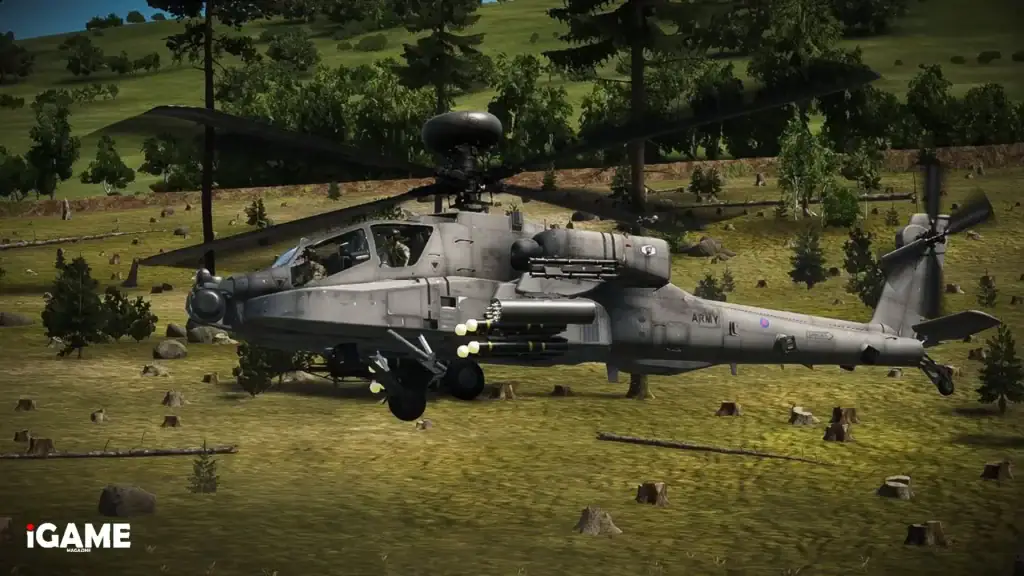
The British Apache WCS is one of several community-made military aircraft available through the Arma Reforger Workshop.Image: Arma Reforger Workshop (mod authors)
If you're planning to host your own server, make sure every player has the same mods installed to avoid connection issues.
Tips for Getting the Best Experience
While installing mods is straightforward, a few simple habits can help you avoid problems and enjoy a smoother experience.
Keep Your Mods Updated
Workshop creators regularly release bug fixes, balance updates and new features. Updating your mods ensures the best compatibility with multiplayer servers.
Read the Workshop Description
Many mods require additional dependencies or recommend specific server settings. Taking a minute to read the description can save a lot of troubleshooting later.
Don't Install Everything at Once
It can be tempting to subscribe to dozens of mods immediately, but installing too many at once makes it harder to identify compatibility issues. Start with a few trusted mods and expand your collection gradually.
Join Active Community Servers
Many mods are at their best when played with an active community. Joining established servers often provides a more polished and enjoyable experience than playing alone.
Common Mod Issues and How to Fix Them
Although the Workshop handles most of the installation process automatically, you may occasionally run into problems.
Mods Won't Download
Restart the game and check your internet connection. If the issue continues, unsubscribe from the mod and subscribe again.
Can't Join a Server
This usually means you're missing one or more required Workshop items.
Check the server requirements and ensure all dependencies are installed and updated.
Mods Keep Updating
This is completely normal. Workshop creators regularly release fixes and improvements, and Arma Reforger automatically downloads the latest version.
Performance Issues
If you notice lower frame rates after installing several mods, try disabling any you aren't currently using. Larger maps and heavily scripted scenarios naturally place greater demands on your console.
Final Verdict
The introduction of console Workshop support has transformed Arma Reforger into one of the most moddable military shooters available on Xbox and PlayStation 5. What was once a feature reserved primarily for PC players is now accessible to console communities, opening the door to thousands of new experiences created by passionate modders.
Whether you're leading a resistance movement in Overthrow, building a new life in RPLife, expanding your arsenal with Modern Military Equipment, exploring the rugged terrain of Kunar Province, or creating cinematic missions using Game Master FX, there's never been a better time to start experimenting with Arma Reforger console mods.
As Bohemia Interactive continues to support the Workshop and the community releases new creations, this list will continue to evolve. We'll keep this guide updated with the latest recommendations, ensuring you always have the best console mods at your fingertips.
Useful Links
- Official Arma Reforger Workshop
- Official Arma Discord
- Official Arma Reforger Steam Store
- Official Arma Reforger XBOX Store
- Official Arma Reforger PS5 Store
- Bohemia Interactive
Related Articles

David Ware is the Founder and Managing Editor of iGame Magazine. Since 2024 he has built igamemag.com into a trusted online destination for gamers and tech enthusiasts, covering the latest gaming news, in-depth game reviews, hardware and tech breakdowns, and practical guides.
How we write: every article is researched from official sources, such as developer posts, store pages and press releases, then fact-checked and edited by David Ware before it's published. We use AI tools to help with research and drafting.
Related on iGame
 More Game NewsPalworld Side by Side Update Announced for Winter 2026, as the Popularity Poll Crowns SekhmetOct 20, 2026
  More Game NewsShogun 2 Complete Edition Pulled From Sale After Backlash: What Happened and What Owners Can DoOct 19, 2026
  More Game NewsFootball Manager 27 Release Date Confirmed: November 10, Platforms, Launch Preview and New FeaturesOct 17, 2026
  More Game NewsDragonwilds 1.0.1 Is Live: Jump Attacks, Ranged Specials, Bigger Inventory and the Save Fixes ExplainedOct 17, 2026
  More Game NewsInsurgency: Sandstorm Operation: Echoes Is Out – UM45 and MP40 Return, Map Overhauls and Update 1.22 Patch NotesOct 16, 2026
  More Game NewsAbiotic Factor’s Year 2 Roadmap: Official Mods, a Winter Update and Entropic Break in 2027Oct 16, 2026