


Cyberpunk 2077 Multiplayer Servers Are Here With OPEN//77: How to Join, Host Your Own and What It Costs
Cyberpunk 2077 multiplayer servers are live with OPEN//77, a free fan-made mod in open alpha. How to join, how to host your own server, requirements and hosts.


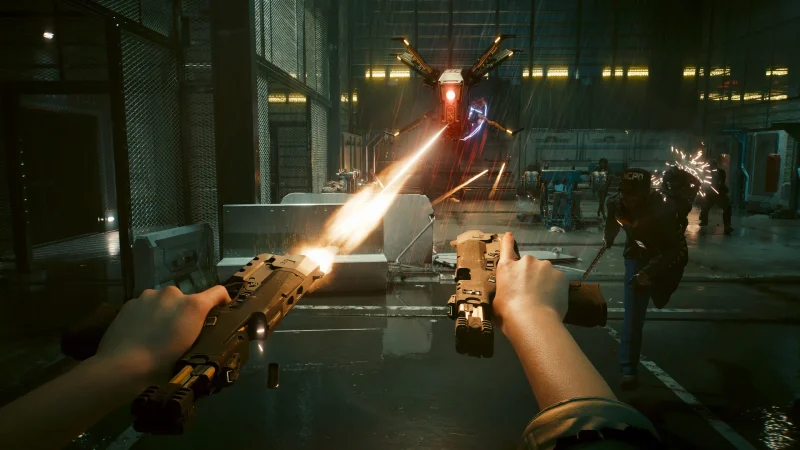
Cyberpunk 2077 multiplayer servers are now live, thanks to OPEN//77 (also written OPEN//2077 or Open77), a free, fan-made multiplayer platform that's now in open alpha. Anyone with a legal PC copy of Cyberpunk 2077 and Phantom Liberty can download the launcher and join community servers, from strict roleplay cities to street racing leagues, and anyone can now host their own server without applying first. It's an unofficial project, not made or endorsed by CD Projekt Red, so expect bugs. Here's everything you need to know.
Cyberpunk 2077 multiplayer servers at a glance
| What it is | OPEN//77, an unofficial community multiplayer platform |
| Status | Open alpha (no application needed) |
| Price | Free launcher and free account; no price listed for the server software |
| Players need | A legal PC copy of Cyberpunk 2077 2.5 + Phantom Liberty |
| Server modes | Roleplay, racing, PvP, survival, free roam, custom modes |
| Hosting | Free licence key; Windows or Linux server, no game install needed |
| Platform | PC only |
| Official? | No, not affiliated with CD Projekt Red |
Does Cyberpunk 2077 have multiplayer servers?
Not officially: CD Projekt Red's game is single-player. OPEN//77 adds multiplayer as a mod, run on dedicated servers by the community. Its own site describes it as "an unofficial, independent community project" that isn't "affiliated with, endorsed by, or sponsored by CD PROJEKT S.A."
What can you do on OPEN//77 servers?
Each server owner sets their own rules, so every server plays differently. The official site groups them into three kinds:
- Roleplay: strict RP cities with their own economies, factions, jobs and staff.
- Custom worlds: PvP, survival, free roam or completely new modes.
- Racing: racing leagues and open roads.
The near-daily devblog shows how fast it's moving: in November alone the team has added vehicle customization, built-in quickhacks, native voice chat, HUD and map, smarter NPC fights, braindances, an in-world character creator and much faster server joins.


What do you need to play Cyberpunk 2077 multiplayer?
- A legal PC copy of Cyberpunk 2077 on version 2.5, the Edgerunners 2 update CD Projekt Red released on October 22, 2026.
- The Phantom Liberty expansion.
- The free OPEN//77 launcher, which signs you in, checks your game and installs the mod.
OPEN//77 says playing "will always require your own legal copy" of the game and that cracked copies are "neither supported nor welcome". One host's page still lists version 2.31, but OPEN//77's own page asks for 2.5.
How do I join an OPEN//77 server?
- Download the OPEN//77 launcher from open2077.net and sign in with a free account.
- Let the launcher check your game and install the mod.
- Browse the public server list, pick a world and press connect.
How do I host my own Cyberpunk 2077 server?
According to the OPEN//77 create page, it takes three steps:
- Download the dedicated server (Windows or Linux, 64-bit; the .NET runtime is included). The server doesn't need the game installed.
- Create a free account and generate a licence key in the keymaster.
- Put the key in your server config, set your slots, rules, language and mode, and add resources. Your server then appears in the public browser.
You can run it on your own hardware or a rented machine. Server owners get the Warden admin panel for moderation, whitelists and staff tools, and can script their own modes in Lua 5.4 (each resource runs in its own sandbox and reloads live) with access to vehicles, blips, NPCs and weather, plus Chromium-based WebUI for HUDs and menus. The docs have the full API.

Which hosts offer OPEN//77 servers?
If you'd rather not run a server yourself, several game hosts have added OPEN//77 plans. As of November 13, 2026:
- PingPerfect: available now, from $7.99 a month for 50 slots, with a 48-hour free trial.
- GTX Gaming: coming soon, price announced when ordering opens; 10 GB RAM (upgradable to 64 GB), up to 100 GB NVMe storage, 21 locations across Europe, North America, Asia and Australia, daily backups, and a control panel with file manager and SFTP. GTX says every server includes 24/7 support by live chat and ticket and enterprise DDoS mitigation, and that its team will help you set up your OPEN//77 server.
- LOW.MS: listed as coming soon, prices announced at launch, 13 locations across Europe, North America, Asia and Oceania.
- Physgun: listed as coming soon, from $2.49 a month in Chicago and London.
OPEN//77 itself doesn't publish official RAM requirements or a guaranteed player count, and it's an alpha, so check what a plan includes before you pay. You'll still need your own free licence key from open2077.net whichever host you pick.
Tip: if your server starts crashing or lagging, check your mods and scripts first. On modded servers, most problems come from a mod or resource rather than from the host's hardware, so try disabling recently added resources before you raise a ticket.
Is OPEN//77 on PS5 or Xbox?
No. It's a PC mod. The devblog mentions Xbox launcher support, which refers to the PC version of the game bought through the Xbox app, not Xbox consoles.
Is OPEN//77 safe and allowed?
It's an unofficial mod in alpha, so bugs, crashes and breaking changes are expected. It isn't approved by CD Projekt Red, and as with any mod, you install it at your own risk. Stick to the official launcher from open2077.net.
Is there an OPEN//77 trailer?
The project posts videos on its official YouTube channel (@Open2077-cp) and streams on Twitch; links are on open2077.net. The official Cyberpunk 2077 trailers play on its Steam page.
More on iGame Magazine
- The Best Games of 2026 So Far, Ranked by Critics: the best-reviewed games of 2026
- Cyberpunk 2077: End of an Era: our earlier Cyberpunk 2077 coverage
FAQ

David Ware is the Founder and Editor-in-Chief of iGame Magazine. Since 2024 he has built igamemag.com into a trusted online destination for gamers and tech enthusiasts, covering the latest gaming news, in-depth game reviews, hardware and tech breakdowns, and practical guides.
How we write: every article is researched from official sources, such as developer posts, store pages and press releases, then fact-checked and edited by David Ware before it's published. We use AI tools to help with research and drafting.
Related on iGame
 Our earlier Cyberpunk 2077 coverageCyberpunk 2077: End of an EraMay 29, 2024
 The best-reviewed games of 2026The Best Games of 2026 So Far, Ranked by CriticsOct 26, 2026
 More Game NewsHell Let Loose Update 22 Delayed: Lake Balaton Map Now Early December, and HLL Vietnam’s Khe Sanh Update Slips TooNov 13, 2026
 More Game NewsMarathon Symbiosis Update Is December 8: PvE Expedition Mode, Bishop, a 3v3 Deathmatch and a Free Open Play WeekNov 13, 2026
 More Game NewsOnce Human Season 5 Dissonant Resonance Starts November 18: Shoot Musical Notes, Fight The Echo in a 4-Player RaidNov 13, 2026
 More Game NewsConan Exiles Legacy of the Giant-Kings Part Three Is Live: Akhamet’s Final Quest Ends the Story EarlyNov 13, 2026