

SanDisk Desk Drive 8TB Review: Fast Desktop SSD Storage for Gamers
Our SanDisk Desk Drive 8TB review covers speed, design, power, PC and console use, backups, and whether this huge desktop SSD is worth the money.
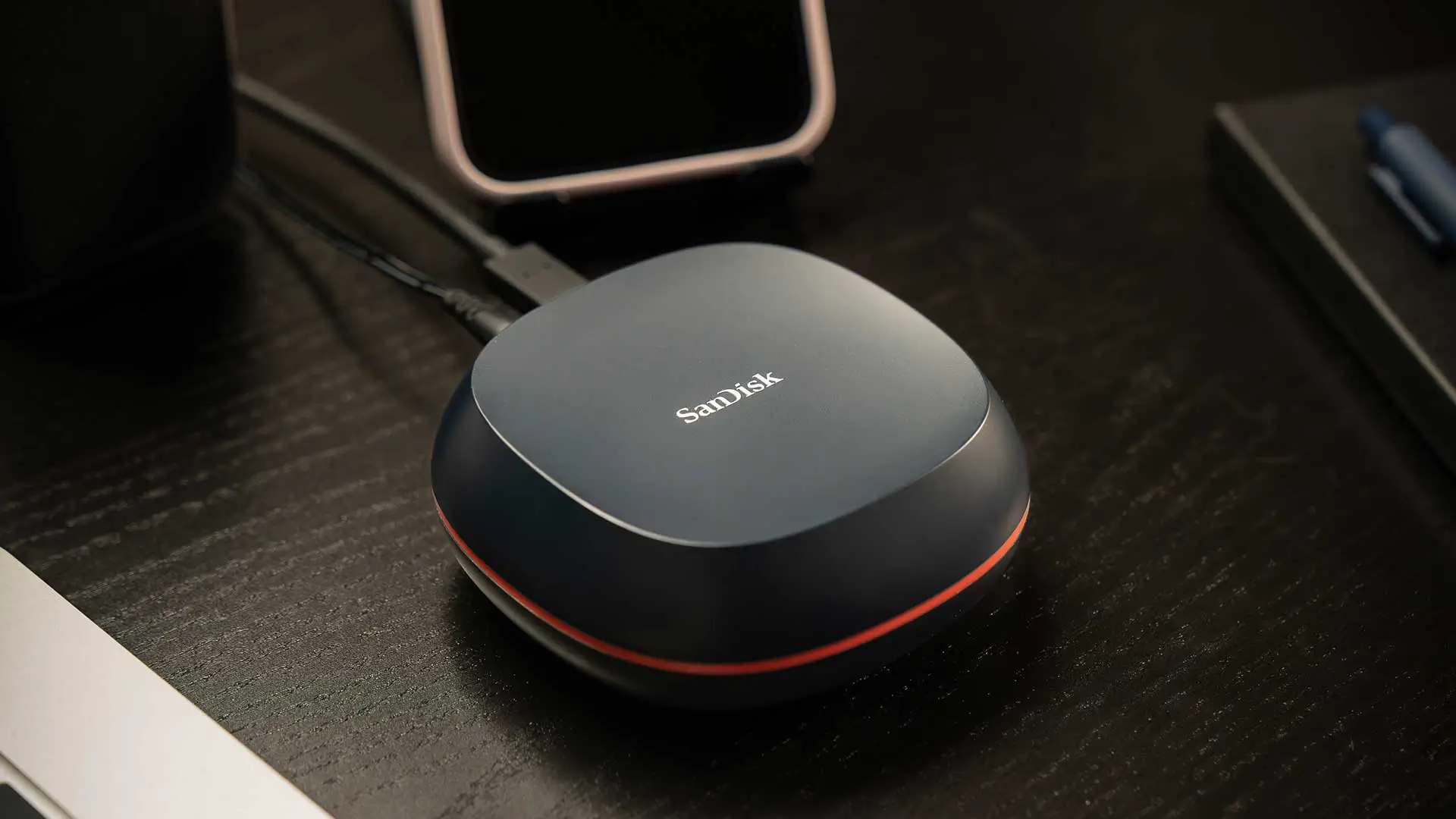
Image: SanDiskOur SanDisk Desk Drive 8TB review in short: this is a huge, fast external SSD designed to live on your desk. With up to 8TB of space and read speeds up to 1,000MB/s over USB-C, it's a brilliant place to keep a big game library, mods, recordings and backups. It needs its own power adapter and it isn't cheap, but nothing else gives you this much fast, silent storage this easily.
Below we explain what the Desk Drive is, how fast it is, how it works with PCs and consoles, and whether it's worth the money.
SanDisk Desk Drive 8TB at a glance
| Type | Desktop external SSD |
| Capacities | 4TB and 8TB |
| Speed | Up to 1,000MB/s read |
| Interface | USB 3.2 Gen 2 (10Gbps), USB-C |
| Power | Mains power adapter (included) |
| Size | About 99 x 99 x 40mm |
| Weight | About 268g |
| Works with | Windows 10 and later, macOS 11 and later (exFAT out of the box) |
| Extras | Backup software, Apple Time Machine support, Kensington lock slot |
| Warranty | 3 years |
What is the SanDisk Desk Drive?
Most external SSDs are tiny portable drives built for your pocket. The Desk Drive takes a different approach. It's a compact desktop box that plugs into the mains and stays put, designed to give you a massive amount of fast SSD storage for backups, media and games. SanDisk launched it in 2024 in 4TB and 8TB capacities.
Because it's an SSD rather than a traditional hard drive, it's silent, has no moving parts and is far faster than the big desktop hard drives it's designed to replace.
Design and build
The Desk Drive is a small, square, understated box, roughly 10cm across, that sits neatly next to a monitor or PC. It connects with a single USB-C cable and has a separate power adapter, plus a Kensington lock slot if you want to secure it in an office or shared space.
The mains power is the key thing to know. This isn't a drive to throw in a bag; it's built to stay on your desk. If you need storage on the move, a bus-powered portable SSD is a better fit.
How fast is the SanDisk Desk Drive?
SanDisk rates the Desk Drive at up to 1,000MB/s over its USB 3.2 Gen 2 connection. That's around five to six times faster than a typical external hard drive, which makes a big difference when you're copying large game folders, video recordings or backups. Loading games from it is also much quicker than loading from a hard drive.
To get the full speed, plug it into a USB 3.2 Gen 2 (10Gbps) port. It'll still work on older USB ports, just more slowly.
Is the SanDisk Desk Drive good for gaming?
On PC, yes. You can install games straight onto it through Steam, the Xbox app, Epic and others, and 8TB is enough for an enormous library. Games load far faster than from an external hard drive, though a fast internal NVMe SSD will still be quicker for the most demanding new releases.
On consoles, it depends on the generation. PS5 and Xbox Series X|S can use external USB drives to play last-generation PS4 and Xbox One games and to store current-gen games, but current-gen titles need to be moved to internal or expansion storage to play. That still makes it a handy, fast place to park games you're not playing so you don't have to re-download them.
Backups and compatibility
The Desk Drive comes formatted as exFAT, so it works on both Windows and Mac straight away. SanDisk includes backup software to make automatic backups easy, and it supports Apple Time Machine. For gamers and creators, it's a great way to back up recordings, mods and save files alongside your game library.
Is the SanDisk Desk Drive worth it?
If you need a lot of fast storage in one place, yes. The 8TB model isn't cheap, and prices vary a lot between retailers, so it's worth shopping around. Compared with buying several smaller portable SSDs, though, it's a neat, simple way to get 8TB of fast storage on one cable. If you mainly need lots of cheap space for files you rarely touch, a big external hard drive is still far cheaper per terabyte.
Final verdict
The SanDisk Desk Drive 8TB is a fast, silent and enormous external SSD that's ideal for big game libraries, creators and anyone who wants quick, reliable backups. It needs mains power and costs more per terabyte than a hard drive, but if you want lots of SSD-speed storage on your desk, it's an excellent choice.
Huge, fast external storage for big game libraries, if you can stomach the price.
What we liked
- A massive 8TB for whole game libraries and mods
- Up to 1,000MB/s, far faster than an external hard drive
- Silent and compact desktop design
- Plug-and-play USB-C on Windows and Mac, with backup software
What we didn’t
- Needs its own mains power adapter
- Expensive per terabyte compared with hard drives
SanDisk Desk Drive FAQ
Does the SanDisk Desk Drive need a power adapter?
Yes. It's a desktop drive and uses the included mains power adapter, so it's designed to stay on your desk.
How fast is the SanDisk Desk Drive?
Up to 1,000MB/s read over USB 3.2 Gen 2 (10Gbps).
Can you use the SanDisk Desk Drive with a PS5 or Xbox?
Yes, as extended storage. You can play last-gen games from it and store current-gen games, but current-gen games must be moved to internal or expansion storage to play.
What capacities does the SanDisk Desk Drive come in?
4TB and 8TB.

David Ware is the Founder and Managing Editor of iGame Magazine. Since 2024 he has built igamemag.com into a trusted online destination for gamers and tech enthusiasts, covering the latest gaming news, in-depth game reviews, hardware and tech breakdowns, and practical guides.
How we write: every article is researched from official sources, such as developer posts, store pages and press releases, then fact-checked and edited by David Ware before it's published. We use AI tools to help with research and drafting.
Related on iGame
 More PC hardware newsAI Motherboards: The Next Smart Revolution in PC HardwareMay 7, 2025
  Upgrade your keyboard tooRazer Huntsman Tournament Edition Review: Still a Top Esports Keyboard?Apr 11, 2024
  A great wireless mouseRazer Viper Ultimate Review: Is This Wireless Mouse Still Worth It?Apr 13, 2024
  Our top-rated wireless headsetSteelSeries Arctis 9 Review: Still Worth Buying in 2026?Apr 23, 2024
  More Tech ReviewsAcer Predator Atlas 8 Review Roundup: Seriously Fast, but Watch the Screen, Controls and Sleep ModeNov 2, 2026
  More Tech ReviewsLogitech G Yeti 2 Review Roundup: Critics Love the Smart Mic, but Don’t Expect XLROct 27, 2026