
Abiotic Factor Mods Are Here: How to Install Them, Join Modded Servers and Make Your Own
Abiotic Factor mods are officially supported since Community Update 5. How to install mods, enable them per world, join modded servers and get the Mod Editor.

Abiotic Factor mods are now officially supported. Community Update #5, "The Modding Update", arrived on 26 October 2026 with a built-in mod browser powered by mod.io and a free Official Mod Editor for making your own. Installing a mod takes a few clicks, but there's one step that catches people out: gameplay mods have to be switched on for each saved world.
Here's how it all works, based on Deep Field Games' own guide and patch notes.
Abiotic Factor mods at a glance
| Added in | Community Update #5, "The Modding Update" (26 October 2026) |
| Where mods come from | The in-game Mod Library, powered by mod.io |
| Cost | Free with the game (Abiotic Factor is £29.99 / $34.99 / €33.99 on Steam) |
| Gameplay mods | Enabled per saved world, from the Mods button on the world save screen |
| Cosmetic mods | Enabled once, from the Customisation screen |
| Joining a modded server | The game downloads the server's mods for you |
| Making mods | Free Official Mod Editor, a separate PC app |
How do you install mods in Abiotic Factor?
Everything happens inside the game. You don't need a mod manager or to copy files into folders.
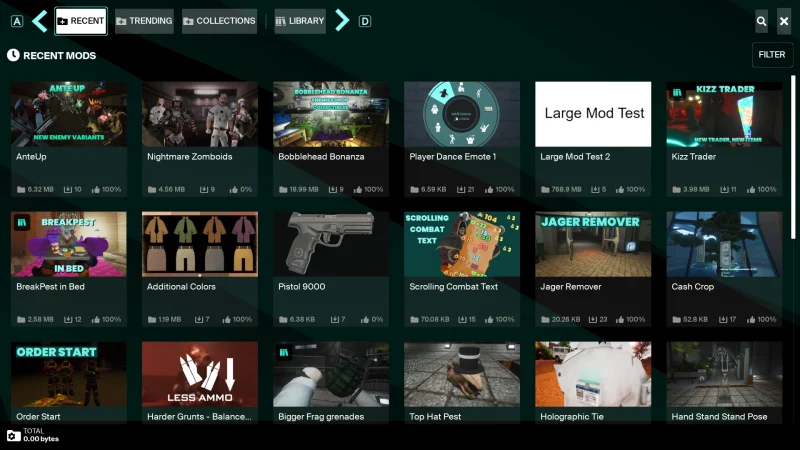
- Click the new MODS button on the main menu. This opens the Mod Library, where you can browse every mod, search by name and filter by tags.
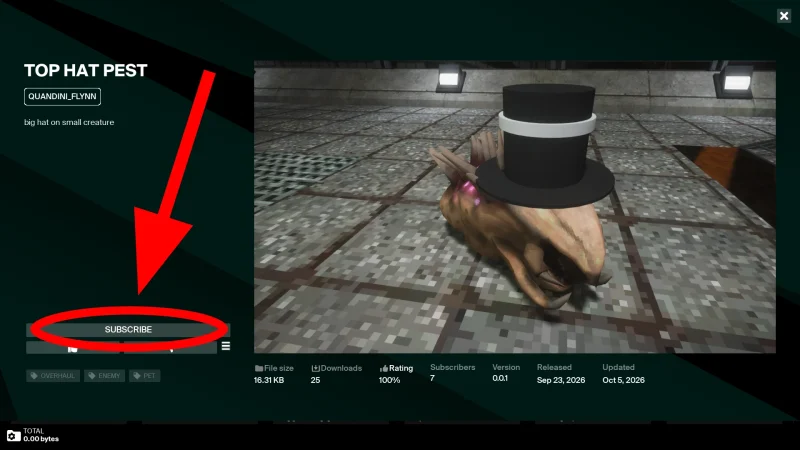
- Pick a mod and click SUBSCRIBE. It downloads straight away. Repeat for as many mods as you like. Clicking UNSUBSCRIBE uninstalls a mod.
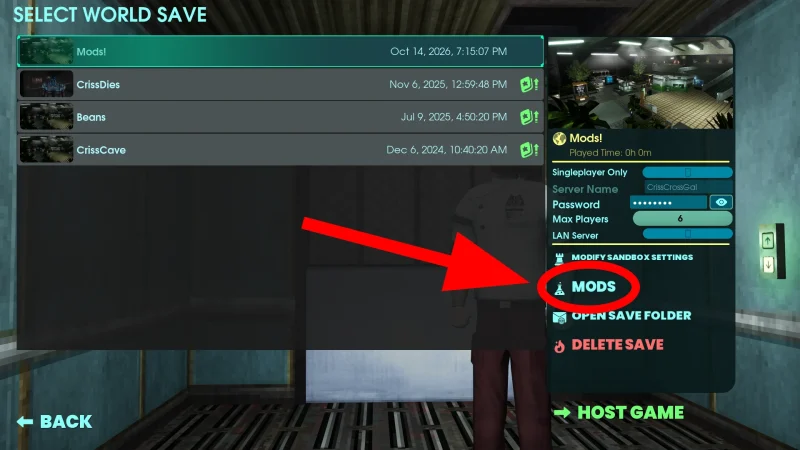
- Enable your gameplay mods for a world. Go to your Saved Worlds, select a world and click the MODS button there. Tick the mods you want and click SAVE.
- Host your game as usual. That's it: the world now runs with those mods.

Why aren't my Abiotic Factor mods working?
The most common reason is that the mod is downloaded but not enabled for the world you're playing. Subscribing only installs a mod. Gameplay mods, the ones that add items, enemies, recipes or change the rules, only run in worlds where you've ticked them on that world's Mods screen. So if you start a new world, remember to enable your mods for it too.

To check whether something in your world comes from a mod, hover over it: modded items and recipes get a small tooltip marker, so you can tell them apart from the base game.
How do cosmetic mods work?
Cosmetic mods are kept separate so you don't have to switch them on in every save:
- Click the MODS button on the Customisation screen.
- Enable the cosmetic mods you want. They then appear as options in your normal customisation screen.
There's a catch in co-op. Only players who have the same cosmetic mod installed can see it. If your friends don't have it, they'll see you in default clothes. Deep Field's advice is simple: tell your friends which cosmetic mods you use so they can download them too.
How do you join an Abiotic Factor server with mods?
You don't have to hunt the mods down yourself:
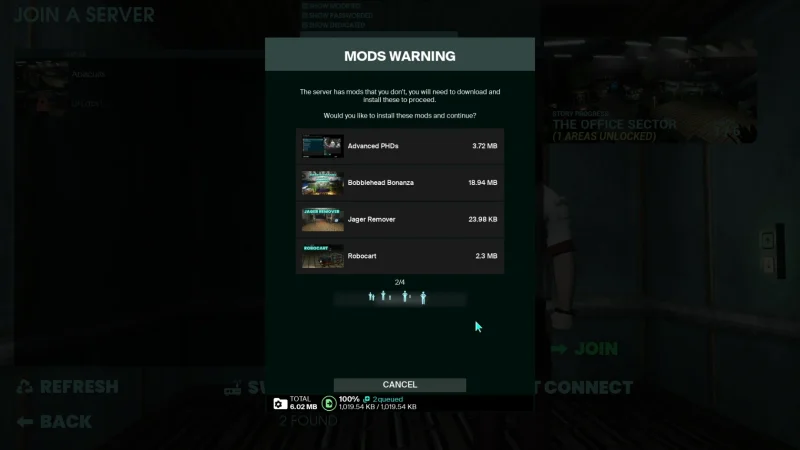
- Click JOIN. A Mods Warning window lists the mods the server uses and their download sizes.
- Click CONTINUE. The mods download automatically, and once they've finished you're dropped into your friend's world.

What kind of mods can you get?
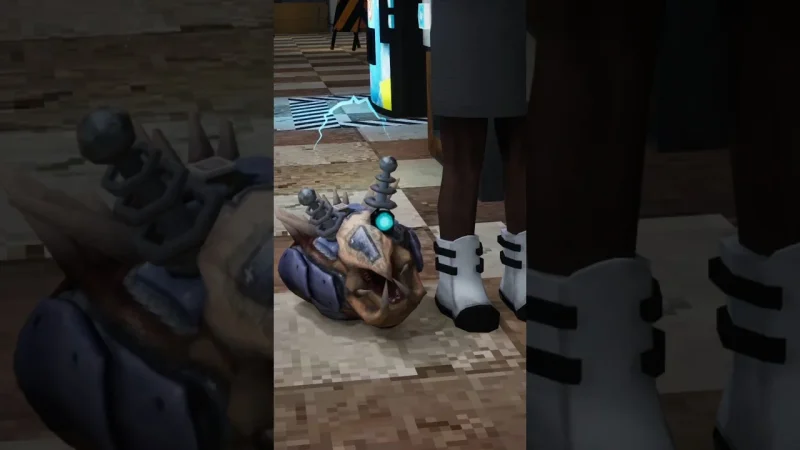
Deep Field says modders can create new items, weapons and gadgets, new enemies and entities, recipes, pets, loot and resources. The first wave in the library includes enemy variants, weapon mods, quality-of-life tweaks, balance changes and cosmetics such as new hats and colours. Every mod is made by the community, so check its page, file size and rating before you subscribe, and expect some to break when the game updates.

How do you make your own Abiotic Factor mods?
With the free Abiotic Factor Mod Editor, a separate application for PC that Deep Field built with mod.io. You use it to make the mods, then share them through mod.io so players can find them in the in-game Mod Library. Deep Field says it will keep developing the editor in future updates.
Can you use mods on PS5 and Xbox?
Deep Field said the mod menu would be "directly accessible in-game for all Scientists" on each platform, which is how mod.io works on consoles too. The Mod Editor itself is PC only, so console players can download mods but can't make them. Console stores usually check mods more strictly, so not every PC mod will necessarily appear there.
What else is in Abiotic Factor Community Update #5?
- Side quests: the first test of a new side quest system, with extra hints when you help Grayson and "a familiar talking trinket". Deep Field plans many more.
- A new pet: "a bony little buddy from a misty realm", which Deep Field calls its foggy friend.
- Head ties: new headwear for a "corporate-combatant" look.
- Rebalancing: cooking now rewards how much effort you put into a meal, and the chemistry system has been carefully retuned.
The full patch notes are in Deep Field's Steam discussion post.

What's next for Abiotic Factor?
Modding is the first big item on Deep Field's Year 2 roadmap. Still to come are a Winter Update and the paid Entropic Break DLC with a free update alongside it, now due in the first quarter of 2027. Our Abiotic Factor roadmap article has everything Deep Field has announced.
More Abiotic Factor on iGame Magazine
- Abiotic Factor’s Year 2 Roadmap: Official Mods, a Winter Update and Entropic Break in 2027: the Year 2 roadmap and Entropic Break
- Abiotic Factor Tips for Beginners: 12 Things to Know Before You Start: 12 tips before you start
- How to Make Soup in Abiotic Factor: Recipes, Buffs and Cooking Level 3: cooking and soup recipes
FAQ

David Ware is the Founder and Managing Editor of iGame Magazine. Since 2024 he has built igamemag.com into a trusted online destination for gamers and tech enthusiasts, covering the latest gaming news, in-depth game reviews, hardware and tech breakdowns, and practical guides.
How we write: every article is researched from official sources, such as developer posts, store pages and press releases, then fact-checked and edited by David Ware before it's published. We use AI tools to help with research and drafting.
Related on iGame
 Abiotic Factor's Year 2 roadmapAbiotic Factor’s Year 2 Roadmap: Official Mods, a Winter Update and Entropic Break in 2027Oct 16, 2026
  Abiotic Factor tips for beginnersAbiotic Factor Tips for Beginners: 12 Things to Know Before You StartMay 8, 2024
  How to make soup in Abiotic FactorHow to Make Soup in Abiotic Factor: Recipes, Buffs and Cooking Level 3May 8, 2024
  More GuidesThe Best Survival Games of 2026 So Far, Ranked by Players and CriticsOct 27, 2026
  More GuidesThe Best Games of 2026 So Far, Ranked by CriticsOct 26, 2026
  More GuidesXbox Game Pass: Final Fantasy VII Remake, Mouthwashing and Every Game Coming and Leaving This WeekOct 26, 2026