
OBS Studio 33.0 Is Out: New Plugin Folders, a Huge Browser Source Upgrade, Better Snapping and What Streamers Need to Check
OBS Studio 33.0 is out: a big browser source upgrade, new plugin folders, smarter snapping, audio monitoring hotkeys and fixes. What changed and what to check.
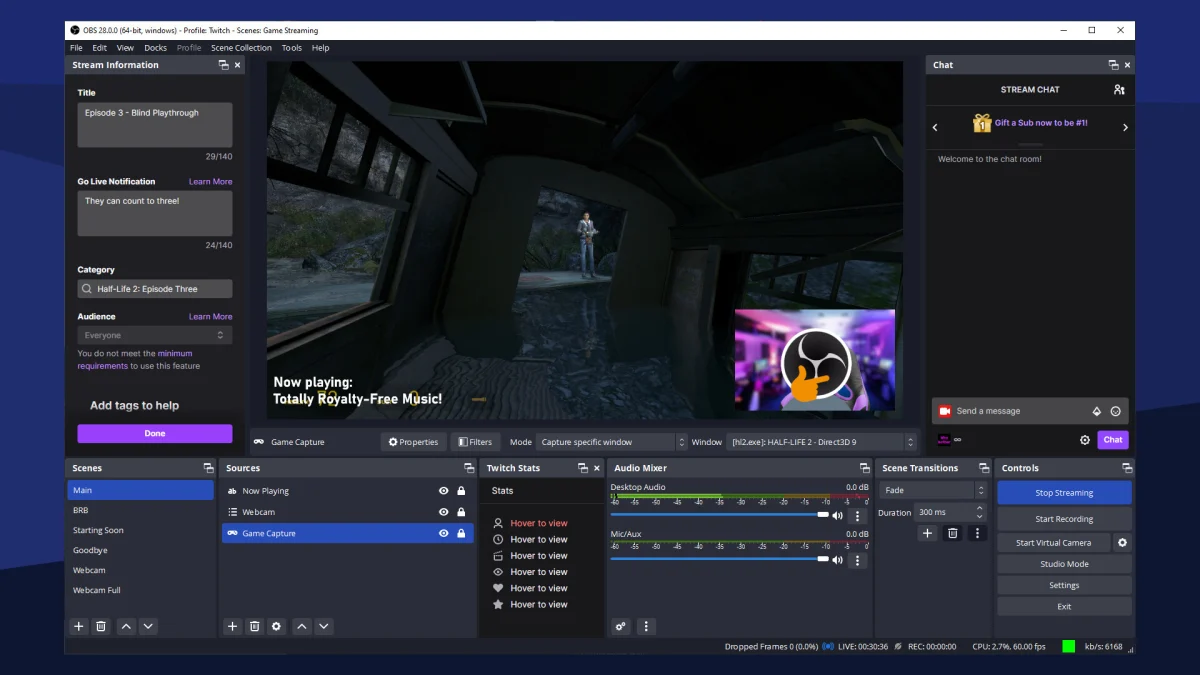
OBS Studio 33 is out. The free streaming and recording software's 33.0 update, released on 20 November, brings a huge upgrade to the engine behind browser sources and docks, a new folder structure for plugins, smarter source snapping, new hotkeys for audio monitoring and a long list of fixes, including one for AMD streams disconnecting. If you stream with alerts, overlays or third-party plugins, there are a couple of things worth checking. Here's what's new.
OBS Studio 33.0 at a glance
| Released | 20 November 2026 |
| Price | Free and open source |
| Biggest change | Browser engine (CEF) updated from version 127 to 150 |
| Plugins | New folder structure; old locations still work until OBS 34 |
| New | Audio monitoring hotkeys, better snapping, NVENC on Arm64 |
| Dropped | Ubuntu 24.04 support |
| Download | obsproject.com or Steam |
What's new in OBS Studio 33?
- Browser sources and docks upgraded: the built-in browser (CEF) jumps from version 127 to 150, bringing it from mid-2024 up to September 2026. The OBS team says the change should be invisible, but asks users to report any odd behaviour in browser sources.
- Plugin loading overhauled: OBS's own plugins now live in a new core folder, and third-party plugins have a new install location and folder structure.
- Better snapping in the preview: a new visual guide, sources snap along the whole axis instead of only when touching, and they no longer snap to hidden sources.
- Number boxes fixed: typing is no longer blocked, numbers aren't cut off, values update when you press Enter (without closing the window), and Shift + Up/Down jumps several steps.
- NVENC on Arm64: NVIDIA's hardware encoder now works on Arm-based Windows PCs.

Other changes and fixes
- Audio monitoring hotkeys: you can now set hotkeys to control the audio monitoring of a source.
- Newest NVIDIA Broadcast SDKs are supported for NVIDIA's audio and video effects.
- Game Capture detects fullscreen games better.
- Studio Mode groups: moving sources inside a group no longer glitches or shows up live in Program.
- AMD streams: fixed a B-frame calculation issue in AMF that could cause streams to disconnect.
- Safe Mode no longer starts the WebSocket server, and doesn't load third-party plugins at all.
- Recording: better file splitting for Hybrid MP4/MOV, and simple output audio bitrate now scales with the number of channels.
- A warning now appears if an encoder is missing when you load a profile, plus several crash fixes (including a macOS 27.2 start-up crash and one when renaming a source).
- Ubuntu 24.04 is no longer supported.
Will my OBS plugins still work after updating to 33?
They should for now. Third-party plugins have a new install location, but OBS 33 still loads plugins from the old (legacy) locations until OBS Studio 34.0. That gives plugin makers and users time to move over. If you rely on third-party plugins, check each one's page for a version built for the new structure before OBS 34 arrives.
What should streamers check after updating?
- Browser sources: alerts, chat boxes, overlays and widgets all run through the upgraded browser engine, so do a quick test before you go live.
- Your plugins: make sure everything still loads, and note which ones need updating before OBS 34.
- Stream decks and remote tools: if you launch OBS in Safe Mode, the WebSocket server won't start, so remote control apps won't connect until you start OBS normally.
How do you update OBS Studio?
OBS usually offers the update when you open it. You can also download it from obsproject.com or update through Steam. The full changelog is on GitHub. OBS doesn't make trailers for its releases, so the release notes are the official source.
More streaming and tech on iGame Magazine
- NVIDIA RTX Spark Laptops Are Out: Every Model, Price and What They Mean for Gaming: NVIDIA RTX Spark laptops
- Gray Zone Warfare Twitch Drops: Every Rogue Ops Reward, Stage Dates and How to Claim Them: how Twitch drops work in Gray Zone Warfare
FAQ
David Ware is the Founder and Editor-in-Chief of iGame Magazine. Since 2024 he has built igamemag.com into a trusted online destination for gamers and tech enthusiasts, covering the latest gaming news, in-depth game reviews, hardware and tech breakdowns, and practical guides.
How we write: every article is researched from official sources, such as developer posts, store pages and press releases, then fact-checked and edited by David Ware before it's published. We use AI tools to help with research and drafting.
Related on iGame
 Twitch drops for streamers and viewersGray Zone Warfare Twitch Drops: Every Rogue Ops Reward, Stage Dates and How to Claim ThemOct 28, 2026
 New NVIDIA hardware for creatorsNVIDIA RTX Spark Laptops Are Out: Every Model, Price and What They Mean for GamingOct 20, 2026
 More Tech NewsYou Can Now Buy the Steam Machine Without a Waitlist, but Only the 512GB Model, and Valve Can’t Promise the Price Will HoldNov 20, 2026
 More Tech NewsThe PlayStation Plus PC App Is Shutting Down on 10 December: What Sony Said and What It Means for Premium MembersNov 16, 2026
 More Tech NewsXbox Playback Is Here: How to See Your 25 Years of Xbox Stats, Including Your First Game and Most-PlayedNov 13, 2026
 More Tech News25 Original Xbox Games Are Now on PC, Including KOTOR, TimeSplitters 2 and Star Wars Battlefront II: Full ListNov 13, 2026